
The short answer
Start with Free if you want one shared place. Pay only if the AI saves work you do every week.
Sunday planning can mean opening a school email, checking a team schedule, writing a grocery list, sending a screenshot to someone else and hoping the right person remembers the next step. That has a cash cost when a family pays for several separate tools. It also takes time, usually from the person who does the reading, copying and reminding.
Nori puts the family calendar, tasks, meal plan, recipes and shopping list in one system. Its public membership page currently lists those core tools as free, along with 10 AI uses. Nori AI Plus is worth considering only after a family tests whether voice, photo, and forwarded email or text remove repeated planning steps. The official membership page currently lists the annual option as $4.99 per month per family, billed annually.
If you only need a shared calendar, everybody is willing to enter events manually, and your current setup works, keep it. Google Calendar for families may be the cheaper and easier answer.
The money test
What will Nori cost?
Nori does not put the core calendar-and-lists system behind a mandatory subscription. That matters for families who want to stop paying for separate places to manage dates, tasks, dinner ideas, recipes and grocery items.
Nori Free
$0
Shared calendar, family tasks, meal plans, recipes, shopping lists and 10 AI uses.
Nori AI Plus · monthly
$7.99/month
Per family. Ongoing AI chat and voice input without an annual commitment.
Nori AI Plus · annual
$4.99/month
Per family, billed annually. $59.99/year.
Source: Nori membership. Public app-store or checkout prices can vary by market; confirm your displayed price before purchase.
How to make the cost call
Stay on Free when the shared calendar, tasks, meal plan, recipes and shopping list cover your household. Consider Plus only when you use AI often enough that the 10 free uses do not cover a normal week. Do not switch when a shared calendar is already all you need.
The time test
Where the slow work happens
A date rarely arrives ready to use. One adult reads the email, spots the useful line, decides whether it affects the family, copies it into a calendar, adds a task, and messages the other person. The same pattern repeats with a photo of a flyer, a reminder said in the car, and a meal idea that turns into a shopping trip.
- 1Receive
Email, photo, text or spoken reminder arrives.
- 2Interpret
Someone decides what belongs on the family plan.
- 3Enter
The detail gets copied into a calendar, task or list.
- 4Hand off
The next person asks, gets a screenshot, or misses the update.
Nori’s official AI materials describe voice, photo, and forwarded email or text as inputs that can help create family plans. The AI can suggest a structure inside the family tools, and the family can review or edit details before relying on them. See how Nori AI currently works.
Six real-life tests
When Nori can save time, and when it cannot
01 · School messages
The school email that turns into three separate jobs
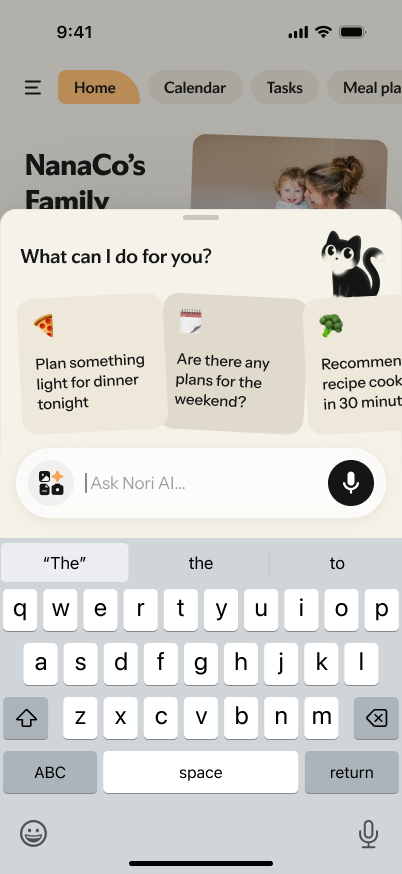
The situation. A teacher emails about spirit day, a parent-teacher booking deadline and soccer practice. In a manual setup, someone reads the email, copies a date into the calendar, makes a note about the deadline and sends a message so the other adult knows what changed.
What may change. Forward the email to Nori AI, then review the suggested calendar event and task. The useful outcome is avoiding separate calendar entry, reminder and handoff steps.
Worth it when. School messages arrive often and one person is always translating them into household work. Check every date and deadline before treating it as final.
02 · In-the-moment reminders
The reminder that arrives when your hands are full
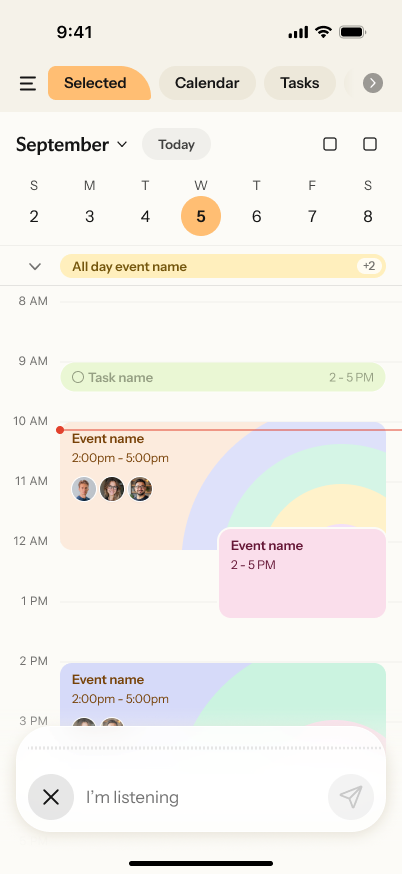
The situation. On the way out the door, someone says, “Add soccer practice tomorrow at four,” or “Put milk and dog food on the list.” The usual result is a phone note, a message to yourself, or a promise to remember later.
What may change. The app supports in-app voice input for adding family details. A spoken reminder can enter the same system that holds the calendar and list, rather than becoming another message to chase down.
Worth it when. Small requests are frequently lost between rooms, people or apps. Voice input still starts from the app’s microphone control; it is not a promise of a hands-free wake word.
03 · Dinner and groceries
The dinner plan that should become a grocery list
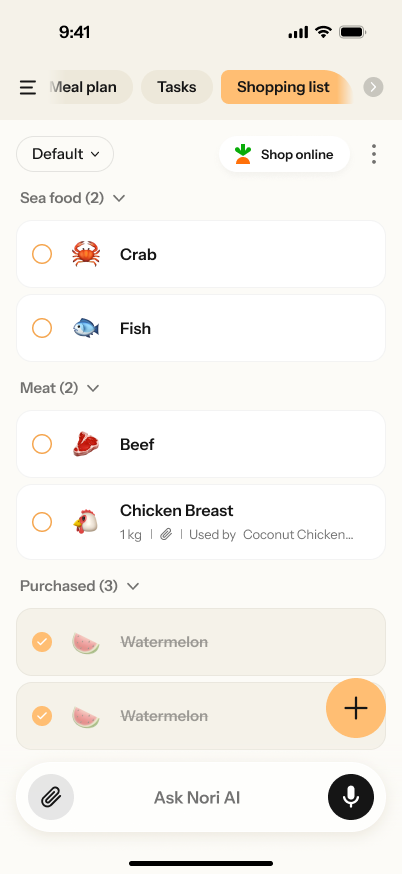
The situation. One person thinks of dinners, another person shops, and neither is sure what is already on the list. The family ends up rewriting ingredients, buying duplicates, or making an extra store stop after something is missed.
What may change. Nori combines meal planning, recipes and a shared shopping list. The point is to keep the dinner decision beside the list the shopper can see.
Worth it when. This can reduce the chance of duplicated or missed items when more than one person plans and shops. It does not guarantee lower grocery spending. Families still need to check quantities, prices and what is already at home.
04 · Weekly handoffs
The weekly handoff that keeps creating screenshots
The situation. One adult has the activity schedule, another does pickup, a caregiver handles an afternoon, and the child needs to know what happens after school. The plan gets copied into a group chat, sent as a screenshot, then changes in only one place.
What may change. Keep events, assigned tasks, meals and the shopping list in a shared family view. Nori’s app, web experience and optional Family Hub are designed to show the same family system in different places.
Worth it when. Information is already moving between people. It will not help if no one except the original organizer checks the shared plan.
05 · Existing calendars
The calendar you do not want to rebuild
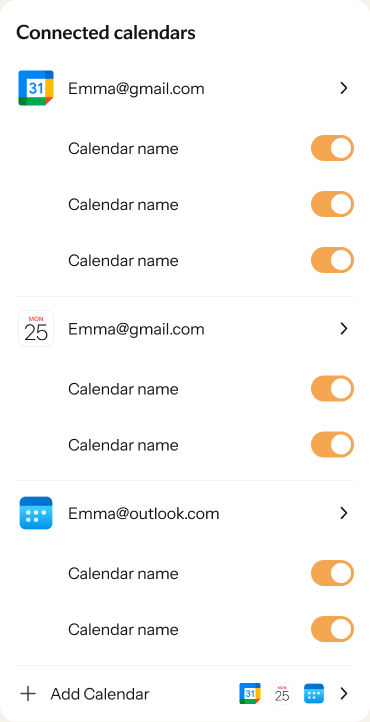
The situation. Work appointments already live in Google, Apple or Outlook calendars. A family wants a fuller household system without typing every existing date into another app.
What may change. Nori’s current Apple App Store and Google Play listings say it can sync with Google, Apple and Outlook calendars. Start with the connections your family already uses, then test the exact accounts and permissions you need.
Worth it when. It avoids a manual rebuild. Calendar behavior can depend on the account, permissions and setup, so confirm the connection before making it part of a family routine.
06 · Keep it simple
The family that should not pay for more software
The situation. Two adults already share a Google Calendar. They add events themselves, do not need shared meal or shopping workflows, and rarely receive information that has to be transformed before it becomes a date.
The better answer. Keep the calendar you use. Nori Free may still be worth a look if you want the broader tools in one place, but AI Plus does not solve a problem this family has. Read Google Calendar vs. Nori for the direct comparison.
Try it before paying
Use Nori Free for one ordinary week.
Choose real family inputs, not test examples. At the end of the week, decide whether the system changed the work your family actually does.
This is not a promised return on investment. It is a practical way to decide whether the free system covers your needs or whether frequent AI input changes a busy week enough to be worth Plus.
Make the call
Who should use Nori, and who should skip it?
Nori is more likely to fit when…
- You manage a calendar, tasks, dinner planning and shopping across separate places.
- School, activity and household information arrives through messages, photos or spoken reminders.
- One person repeatedly translates incoming details into plans for everyone else.
- Your family will check and update one shared system.
A simpler option is likely better when…
- You only need shared dates.
- Events arrive cleanly and manual entry does not bother anyone.
- Everyone already uses the same shared calendar and keeps it current.
- Your household does not want another app to open or maintain.
Readers comparing Nori with a broader household platform can review FamilyWall vs. Nori. Long-time Cozi users can read Cozi vs. Nori, including migration considerations.
FAQ
Common Nori app review questions
Is Nori free?
Yes. Nori’s public membership page currently lists the shared family calendar, family tasks, recipes, shopping list and meal plan as Free Forever. It also lists 10 free AI uses. Check the current plan page before making a purchase decision because features can change.
How much is Nori AI Plus?
At the time of this review, the public U.S. monthly price is $7.99 per family. Nori’s membership page lists the annual option as $4.99 per month per family, billed annually, or $59.99 for the year. Public app-store or checkout prices can vary, so confirm your displayed price before purchase.
Can Nori save money on groceries?
Nori brings meal plans, recipes and a shared shopping list together, which can help a family avoid duplicate or missed items. It does not guarantee lower grocery spending. Your household still chooses meals, checks quantities and decides what to buy.
Can Nori save time?
It can reduce repeat work for families who often turn emails, photos, messages and spoken reminders into calendar events, tasks or shopping items. The time saved depends on the information your family receives, how often you use the shared tools, and whether everyone checks them.
Does Nori work with Google Calendar?
Nori’s public App Store and Google Play listings say it can sync with Google, Apple and Outlook calendars. Confirm the particular account, calendar and permission setup your household needs before relying on a connection.
Is Nori worth it for a calendar-only household?
Often, no. A family that only shares dates and is happy with manual entry may be better served by Google Calendar. Nori becomes more relevant when the family also needs shared tasks, meal plans, recipes and shopping, or when incoming information creates repeated entry work.